
When I’m unable to log into Wordpress I use one of these two techniques to add a new user to WordPress.
Technique #1
Adds a user to WordPress via FTP. This one’s been known as far back as 2011. George Stephanis posted an article on the subject, and it still remains relevant today.
Simply add the below code to your active WordPress theme functions.php file, then visit the site to inject the new user and password into the database.
This will instantly create a new admin user.
Just remember to remove the below code from your functions.php file once you’ve verified the new username and password is working nicely.
function add_admin_acct(){
$login = 'yourusername';
$passw = 'yourpass';
$email = 'youremail';
if ( !username_exists( $login ) && !email_exists( $email ) ) {
$user_id = wp_create_user( $login, $passw, $email );
$user = new WP_User( $user_id );
$user->set_role( 'administrator' );
}
}
add_action('init','add_admin_acct');
Obligatory disclaimer: Make a backup of your database beforehand. Oopsy!
Screen capture example (code above inserted in yellow below):
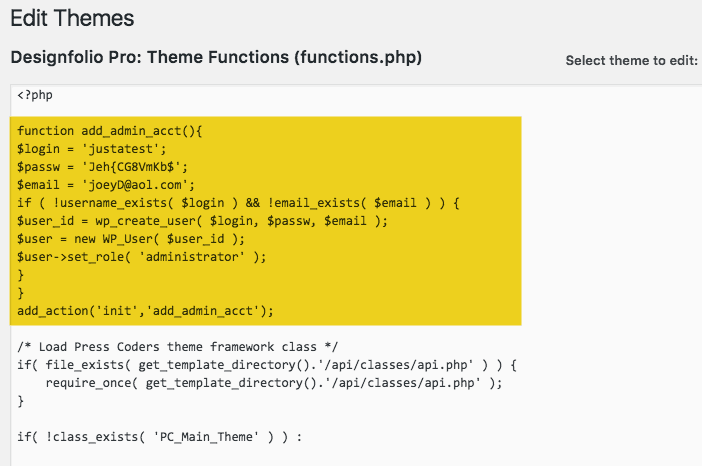
The result after adding the code above to the functions.php. A new user created:

Technique #2
Adds a user to WordPress via phpMyAdmin.
A method I use when phpMyAdmin is available. Simply log into phpMyAdmin and click on the database name shown in the left column.
Not sure what database your WordPress installation uses?
View the line within your wp-config.php file that looks like this:
define(‘DB_NAME’, ‘wp_mydb1’);
Along the top of the page you’ll see a line of tabs that look like this:
Just click on the SQL tab, and paste the below text into the box.
INSERT INTO `wp_users` (`user_login`, `user_pass`, `user_nicename`, `user_email`, `user_status`)
VALUES ('yourname', MD5('mysecretpassword'), 'firstname lastname', '[email protected]', '0');

INSERT INTO `wp_usermeta` (`umeta_id`, `user_id`, `meta_key`, `meta_value`)
VALUES (NULL, (Select max(id) FROM wp_users), 'wp_capabilities', 'a:1:{s:13:"administrator";s:1:"1";}');

INSERT INTO `wp_usermeta` (`umeta_id`, `user_id`, `meta_key`, `meta_value`)
VALUES (NULL, (Select max(id) FROM wp_users), 'wp_user_level', '10');
With text entered and edited click the GO button to create a new user.
You probably should change the text in red before slamming that GO button.
Then log into WordPress as usual with your newly added yourname and mysecretpassword.
That’s it – Enjoy!

Looking for other options to change your WordPress password?
See the HackGuard.com how-to, “How do I reset my WordPress password?”



 Managing the 301 Redirect via Plugin or .htaccess

